

Sequence#
Overview#
The Sequence page allows custom operating sequences to be created, modified and managed for the FlexiBowl®. A sequence is an ordered list of commands that the system executes in automatic succession, combining rotation (MOVE), oscillation (SHAKE), flip and blow movements.
Interface structure#
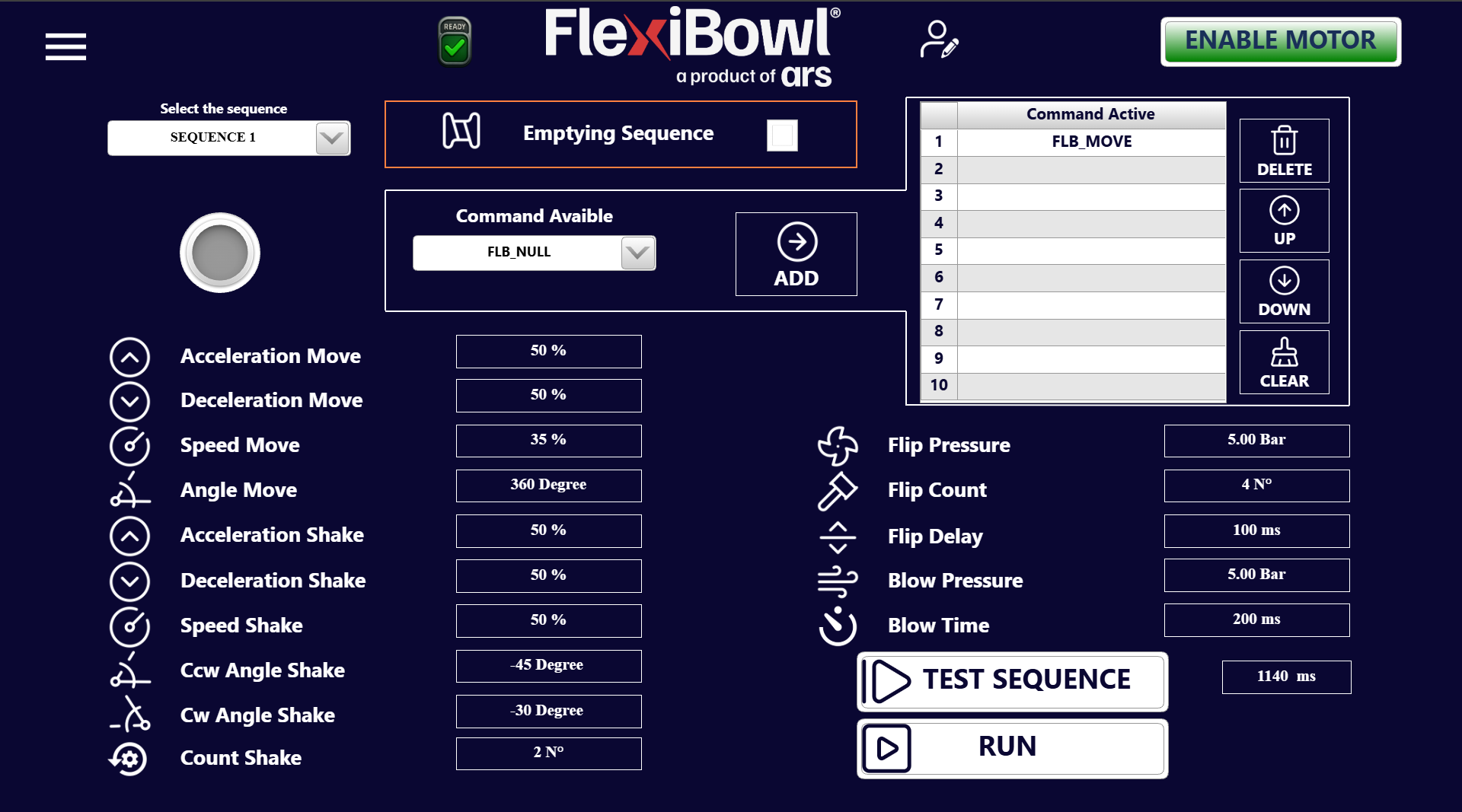
The page is organized into four main areas:
No. |
Area |
Position |
Description |
|---|---|---|---|
1 |
Top left |
Drop-down menu to select the active sequence |
|
2 |
Top center |
Toggle to enable emptying mode |
|
3 |
Left |
MOVE, SHAKE and OPTION parameters; adding commands to the sequence |
|
4 |
Right |
Ordered list of the commands in the active sequence and management tools |
1. Sequence selection#
Important
Before any operation, select the sequence to be modified via the “Select the sequence” drop-down menu at the top left.
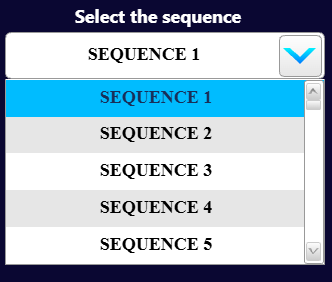
The system supports up to 20 independent sequences (SEQUENCE 1 – SEQUENCE 20), each with its own list of commands and independent parameters. The selected sequence becomes the active one on which all subsequent changes operate.
2. Emptying Sequence#

The Emptying Sequence toggle (top center) enables a mode in which the sequence is executed with the aim of emptying the FlexiBowl® of the components present. It is used when the emptying option has been purchased. For more information on the emptying option, see the dedicated page.
3. Parameters panel#
MOVE parameters#
Parameter |
Example value |
Description |
|---|---|---|
Acceleration Move |
50 % |
Acceleration ramp for the rotation movement |
Deceleration Move |
50 % |
Deceleration ramp for the rotation movement |
Speed Move |
35 % |
Rotation speed of the FlexiBowl® |
Angle Move |
360 degrees |
Rotation angle covered during the MOVE command |
SHAKE parameters#
Parameter |
Example value |
Description |
|---|---|---|
Acceleration Shake |
50 % |
Acceleration ramp during the shake |
Deceleration Shake |
50 % |
Deceleration ramp during the shake |
Speed Shake |
50 % |
Rotation speed during the shake |
Ccw Angle Shake |
-45 degrees |
Counterclockwise rotation angle during each oscillation |
Cw Angle Shake |
-30 degrees |
Clockwise rotation angle during each oscillation |
Count Shake |
2 N° |
Number of complete oscillations per shake cycle |
OPTION parameters (flip and blow)#
Parameter |
Example value |
Description |
|---|---|---|
Flip Pressure |
5.00 Bar |
Air pressure for flip actuation |
Flip Count |
4 N° |
Number of flips performed per cycle |
Flip Delay |
100 ms |
Interval between one flip and the next |
Blow Pressure |
5.00 Bar |
Air pressure for blowing |
Blow Time |
200 ms |
Duration of the blow pulse |
Note
The parameters shown in the left panel apply to the sequence commands. Before adding a command with ADD, check that the values are correct: the parameters are associated with the command at the moment of insertion.
4. Commands panel#
Selecting and adding a command#
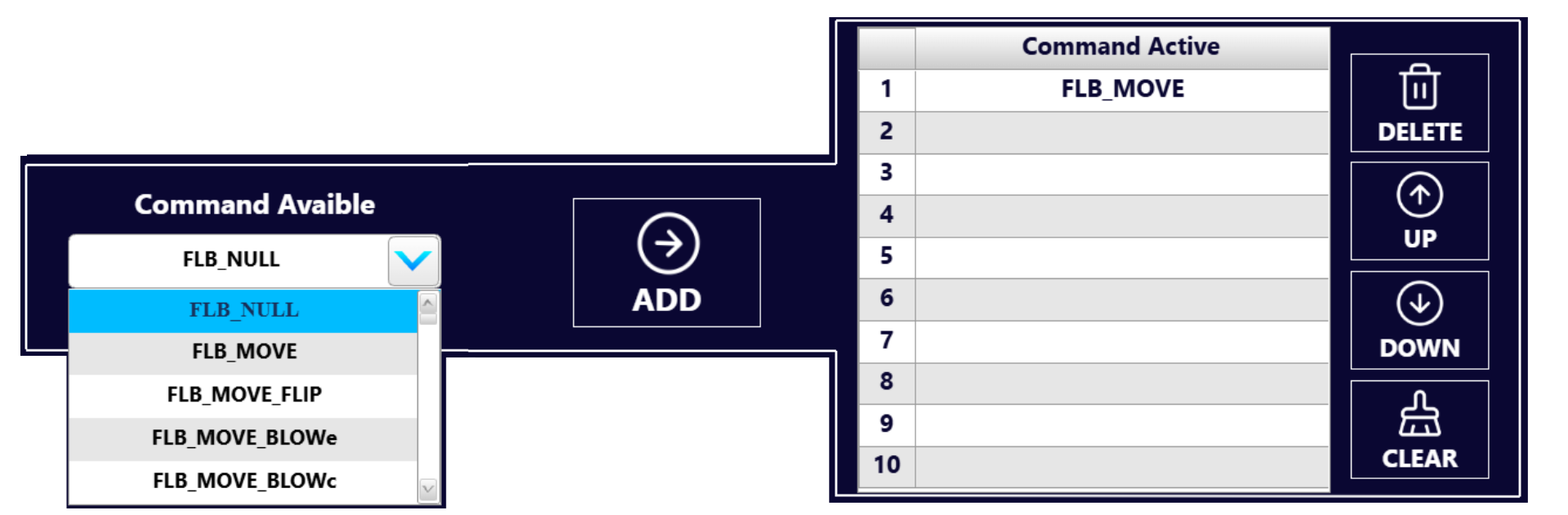
The upper central panel contains:
The “Command Available” drop-down menu: it allows the type of command to be added to the sequence to be selected.
The ADD button (arrow →): adds the selected command at the end of the list of active commands.
The available commands are:
Command |
Description |
|---|---|
|
Null command, no action performed |
|
Rotation of the FlexiBowl® according to the MOVE parameters |
|
Rotation combined with flip (flipping) of the plate |
|
Rotation combined with external blow |
|
Rotation combined with central blow |
|
Rotation combined with central and external blow |
|
Rotation, external blow and flip combined |
|
Rotation, central blow and flip combined |
|
Rotation, central and external blow and flip combined |
|
Shaking of the plate without rotation |
|
External blow, without rotation |
|
Central blow, without rotation |
|
Central and external blow, without rotation |
|
Flip (flipping) of the plate, without rotation |
|
100-millisecond pause |
|
200-millisecond pause |
|
500-millisecond pause |
|
Light 1 on |
|
Light 1 off |
|
Light 2 on |
|
Light 2 off |
|
Enabling of the FlexiBowl® |
|
Disabling of the FlexiBowl® |
|
Lowering of the barrier |
|
Raising of the barrier |
Tip
Select the desired command from the drop-down menu before pressing ADD. The command will be inserted in the first free row of the Command Active list.
The Command Active table shows the sequence of commands in order of execution, numbered from 1 to 10.
In the example shown, the sequence contains only one command:
No. |
Command |
|---|---|
1 |
FLB_MOVE |
2–10 |
(empty) |
List management tools#
Button |
Function |
|---|---|
DELETE |
Deletes the selected command from the list |
UP |
Moves the selected command up by one position |
DOWN |
Moves the selected command down by one position |
CLEAR |
Deletes all the commands present in the list |
Warning
The CLEAR button removes all commands from the sequence with no possibility of recovery. Use it with caution.
5. Running the sequence#
Two execution buttons are located at the bottom right:
Button |
Adjacent field |
Function |
|---|---|---|
TEST SEQUENCE |
Execution time (ms) |
Runs the sequence once only. The field on the right shows the total duration of the last execution in milliseconds |
RUN |
— |
Starts the sequence in continuous operating mode (loop), waiting for triggers from the vision system |
Note
The ms field next to TEST SEQUENCE shows the total execution time of the complete sequence. In the example shown the value is 1140 ms. This figure is useful for synchronization with the machine vision system.
Important
Before pressing RUN, check that:
The motor is enabled (ENABLE MOTOR active)
The system status is READY
The sequence contains at least one valid command in the Command Active list