

Jog Motor#
Overview#
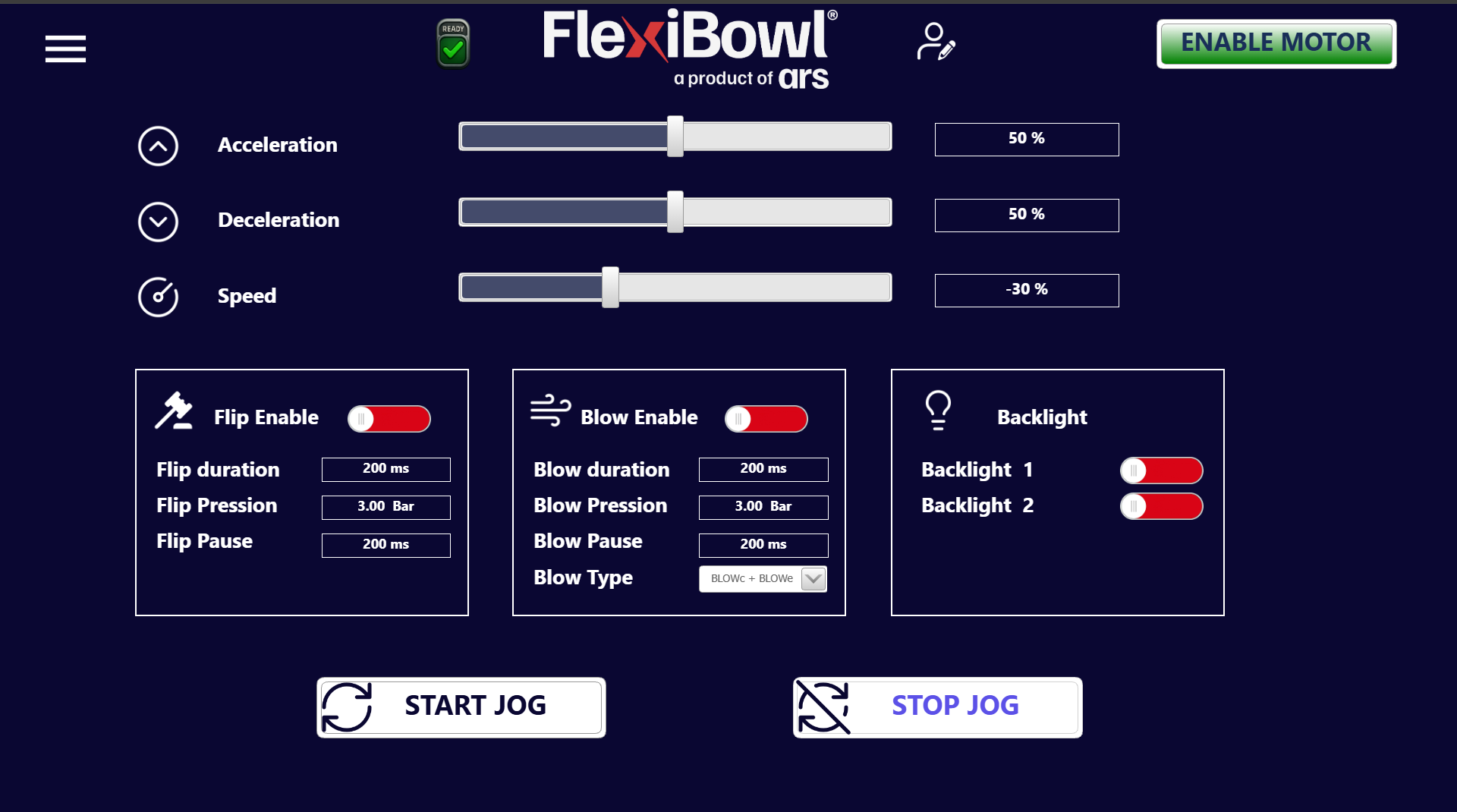
The Jog Motor page allows the FlexiBowl® to be driven in continuous manual mode (jog), without using programmed sequences. It is mainly used during setup, commissioning and testing of the system, allowing the operator to directly control the rotation of the FlexiBowl® and the accessory functions.
Motion parameters#
The three sliders at the top define the behavior of the motor during the jog.
Parameter |
Unit |
Example value |
Description |
|---|---|---|---|
Acceleration |
% |
50 |
Acceleration ramp at jog start |
Deceleration |
% |
50 |
Deceleration ramp at jog stop |
Speed |
% |
-30 |
Rotation speed of the FlexiBowl®. A negative value indicates counterclockwise rotation; a positive value indicates clockwise rotation |
Tip
To reverse the direction of rotation of the FlexiBowl® during the jog, simply set the Speed slider to a negative value. It is not necessary to stop the jog to change the parameter.
FLIP panel#
The Flip Enable panel manages the activation and the parameters of the flipping system during the jog.
Control |
Example value |
Description |
|---|---|---|
Flip Enable (toggle) |
Active (red) |
Enables automatic flip during the jog |
Flip Duration |
200 ms |
Duration of the flip actuation pulse |
Flip Pression |
3.00 Bar |
Air pressure used for the flip |
Flip Pause |
200 ms |
Pause between one flip and the next during the jog |
Note
The flip is executed cyclically during the jog, at the rate defined by Flip Pause, only if the Flip Enable toggle is active.
BLOW panel#
The Blow Enable panel manages the activation and the parameters of the blowing system during the jog.
Control |
Example value |
Description |
|---|---|---|
Blow Enable (toggle) |
Active (red) |
Enables automatic blowing during the jog |
Blow Duration |
200 ms |
Duration of the blow pulse |
Blow Pression |
3.00 Bar |
Air pressure used for blowing |
Blow Pause |
200 ms |
Pause between one blow pulse and the next during the jog |
Blow Type |
BLOWc + BLOWe |
Type of blowing activated. The options combine central blow (BLOWc) and/or external blow (BLOWe) |
Blow Type options#
Value |
Description |
|---|---|
BLOWc |
Central blow only |
BLOWe |
External blow only |
BLOWc + BLOWe |
Both blows activated simultaneously |
BACKLIGHT panel#
The Backlight panel manages the state of the backlights independently of the jog.
Control |
Description |
|---|---|
Backlight 1 (toggle) |
Enables/disables backlight 1 |
Backlight 2 (toggle) |
Enables/disables backlight 2 |
The toggles show red when the backlight is on.
Starting and stopping the jog#
Button |
Function |
|---|---|
START JOG |
Starts the continuous rotation of the FlexiBowl® with the set parameters, simultaneously activating flip and blow if the respective toggles are enabled |
STOP JOG |
Stops the jog and halts the FlexiBowl® |
Important
Before pressing START JOG, check that:
The motor is enabled (ENABLE MOTOR active)
The system status is READY
The Speed, Flip and Blow parameters are set correctly to avoid unwanted movements
Warning
During the jog the FlexiBowl® rotates continuously. Make sure that the area around the FlexiBowl® is free of obstacles and that personnel are not in contact with the moving parts before starting the jog.